The RK3576 datasheet describes what the processor can support. Selecting a production board requires another step: confirming which functions reach usable connectors and operate in the supplied firmware.
For OEMs developing digital signage, touch terminals, or intelligent control equipment, that distinction affects panel compatibility, peripheral integration, and development work. A connector list alone cannot establish whether the complete device will meet its requirements.
Evaluate RK3576 at three levels: processor capability, board implementation, and software validation. Confirm the exact display combination, installed memory, interface assignments, and firmware before approving a sample for production.

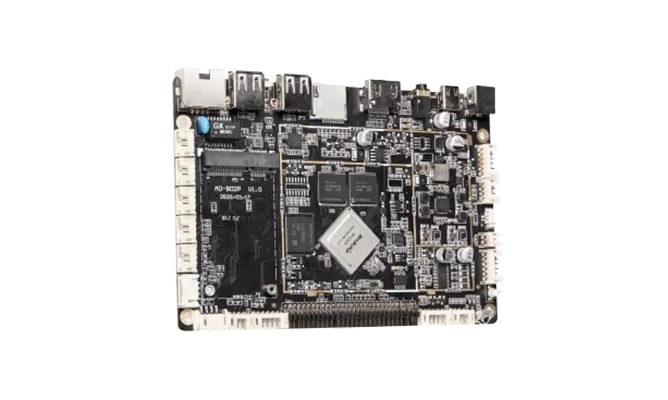
The RK3576 datasheet is a processor specification describing its computing blocks, memory interfaces, multimedia functions, and peripheral capabilities. It is a starting point for system design rather than a specification for every RK3576 motherboard.Rockchip’s official RK3576 brief datasheet lists four Cortex-A72 cores, four Cortex-A53 cores, and a Mali-G52 MC3 GPU. Its NPU is rated at 6 TOPS for INT8 with a sparsity qualification. This theoretical figure does not establish a particular model’s inference speed.The same document lists a 32-bit memory interface supporting LPDDR4, LPDDR4X, and LPDDR5. Board designers select the installed memory type and capacity; a processor supporting LPDDR5 does not mean every board uses it.When reviewing SUNCHIP’s RK3576 Android board options, match the processor information to the proposed configuration, current board specification, and firmware release. Keep those documents together so that purchasing and engineering assess the same version.
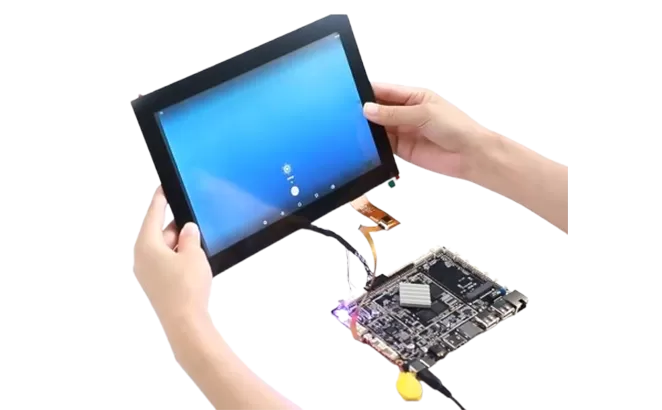
A display interface is the electrical and protocol connection that carries image data from the board to a panel or monitor. Compatibility also depends on signal routing, panel timing, power, cables, and software configuration.
Rockchip lists an HDMI 2.1/eDP 1.3 combo interface, MIPI DSI, and a DisplayPort 1.4/USB 3.0 combo interface. These shared resources make it important to verify permitted combinations rather than counting every listed function as an independent port.Specify each panel’s exact model, resolution, refresh rate, orientation, and interface. For an embedded panel, also request its connector pinout, supply requirements, backlight control, and timing specification. A matching interface name alone is insufficient.The Linux kernel’s display pipeline documentation explains how framebuffers, display controllers, encoders, and connectors participate in producing an image. This provides useful background for Linux projects, but the selected board’s BSP must still support the required route.
HDMI input receives a video signal; HDMI output sends one to a monitor. A board specification advertising HDMI input does not establish that the same connector can drive an external display.SUNCHIP’s AD-C76 specification lists LVDS, MIPI, and eDP display connections, plus HDMI input up to 4K at 60 frames per second. It also describes LVDS and MIPI as alternative options. Confirm the chosen configuration before ordering cables or panels.Video decoding is a separate function from display output. A codec’s decoding limit does not guarantee the same resolution or frame rate at a physical connector. For multiple screens, obtain a written combination of interfaces, timings, and independent or mirrored content, then test that configuration.
RAM is the working memory used by running software, while storage retains the operating system, applications, and content when power is removed. These resources solve different problems and should be specified separately.The AD-C76 specification lists 2GB, 4GB, and 8GB RAM options and eMMC storage options of 32GB, 64GB, 128GB, and 256GB. Confirm the available pairing for the requested order rather than assuming every combination is stocked.
| Specification | Processor-Level Meaning | Board-Level Question | Useful Acceptance Check |
|---|---|---|---|
| Display interface | A supported signaling function or shared interface resource | Which connector and interface combination are implemented? | Operate the actual panel at its required timing. |
| RAM | Supported memory technologies and bus organization | What type and capacity are installed? | Run the application with its intended concurrent workloads. |
| Storage | Supported storage controller interfaces | What device and usable capacity are supplied? | Load content, retain logs, and exercise the update process. |
| Peripheral I/O | Available controller functions and shared resources | Which signals reach connectors with suitable electrical levels? | Test the intended devices together. |
For example, a signage application may need storage for offline media and update files, while an interactive terminal may need additional RAM for its browser, application, and background services. These are workload considerations, not universal minimum specifications.Test with representative content and software. Record memory use during startup, normal operation, content updates, and the busiest expected workload. For storage, allow for the system image, application data, cached media, logs, and the actual update scheme.
Board-level I/O comprises the physical connections, electrical characteristics, and software support that let a motherboard communicate with external devices. Processor controller counts alone do not establish usable ports.
The AD-C76 documentation describes seven USB connections across different connector formats, three TTL serial ports, and one Gigabit Ethernet connection. Internal headers and external sockets should be counted separately when planning installation and servicing.For a printer, NFC reader, scanner, or camera, specify its model, communication protocol, supply requirements, and driver. A TTL UART is not directly interchangeable with RS-232 or RS-485; verify whether the required transceiver circuitry is present.For an expansion device, confirm the selected interface assignment and available bandwidth. Also check peripheral startup current, cable routing, and the behavior of the complete system during restart. Testing devices individually may miss problems that appear when they operate together.
A board support package, or BSP, provides the platform software needed to operate board hardware. Ask for the supplied operating system, firmware identifier, supported peripherals, update method, and recovery procedure.For AI-enabled projects, Rockchip’s official RKNN-Toolkit2 repository includes RK3576 support and tools for model conversion, inference, and performance evaluation. Confirm compatibility between the conversion tools, runtime, and board driver; an NPU rating cannot replace testing the intended model.For a different board format or integration requirement, compare SUNCHIP’s broader Android board portfolio. Retain the required workload and interface list as the basis of comparison, so a change of platform does not hide an unresolved integration requirement.Before releasing a purchase order, request a sample acceptance record covering panel operation, peripheral communication, application startup, power recovery, and sustained operation under the intended enclosure conditions. Agree on test durations and pass criteria for the project.
An RK3576 board evaluation is the process of matching processor capabilities to a verified hardware configuration and a working software release. The datasheet identifies possibilities; the selected board and sample tests establish what your device can deliver.Start with the panel model, application workload, memory needs, peripherals, and operating system. Confirm shared interfaces and electrical compatibility, then approve the complete configuration against agreed acceptance criteria.
Planning an RK3576 product? Share your display specification, peripheral list, target software, estimated quantity, and development schedule with SUNCHIP through its OEM/ODM engineering services. Request a configuration review and sample validation plan before committing to production.
The processor datasheet describes silicon capabilities. A board datasheet identifies the installed components, accessible interfaces, power connections, and supported configurations of a particular motherboard.
No. The processor supports LPDDR5, but the installed memory depends on the board design and order configuration. Verify the supplied RAM technology and capacity.
Do not assume so. Available combinations depend on board routing, shared resources, and firmware; AD-C76 documentation describes LVDS and MIPI as alternative options.
No. HDMI input receives video. Driving a monitor requires a supported output connection and a validated output mode.
Not directly. The electrical signaling differs, so confirm the required level-conversion circuitry, connector pinout, and serial settings before connecting equipment.
Provide the panel datasheet, required interfaces, peripheral models, operating system, application workload, memory and storage needs, expected quantity, and schedule. These details help SUNCHIP assess configuration and adaptation requirements.

 EN